
Equatorial Plasma Bubble (EPB) Alert Instruction Manual
Data Portal
EPB Alert’s data portal webpage is a user-friendly portal that allows users to browse, display and download SEALION and ASEAN-IVO projects. Table 1 shows the station, data type and data availability for both projects.
| Project | Remarks | ||
|---|---|---|---|
| Station | Data (parameters) | Data availability | |
| SEALION | Bac Lieu (Vietnam) | Ionosonde (h’Es, foEs, h’F, foF2) | 2004-present |
| GNSS-septentrio (GTEX, S4) | 2019-present | ||
| Cebu (Philippines) | Ionosonde (h’Es, foEs, h’F, foF2) | 2004-present | |
| Chiang Mai (Thailand) | Ionosonde (h’Es, foEs, h’F, foF2) | 2004-present | |
| GNSS-javad (GTEX, S4) | In preparation (release plan: 2025) |
||
| Chumphon (Thailand) | Ionosonde (h’Es, foEs, h’F, foF2) | 2004-present | |
| GNSS-septentrio (GTEX, S4) | 2019-present | ||
| VHF radar (E-F region RTI plots) | 2020-present | ||
| Kototabang (Indonesia) | Ionosonde (h’Es, foEs, h’F, foF2) | 2024-2021 | |
| ASEAN-IVO | Viantianne (Laos) | GNSS (GTEX) | 2022 |
| Phonm Penh (Cambodia) | GNSS (GTEX) | 2022-2003 | |
How to display and download data:
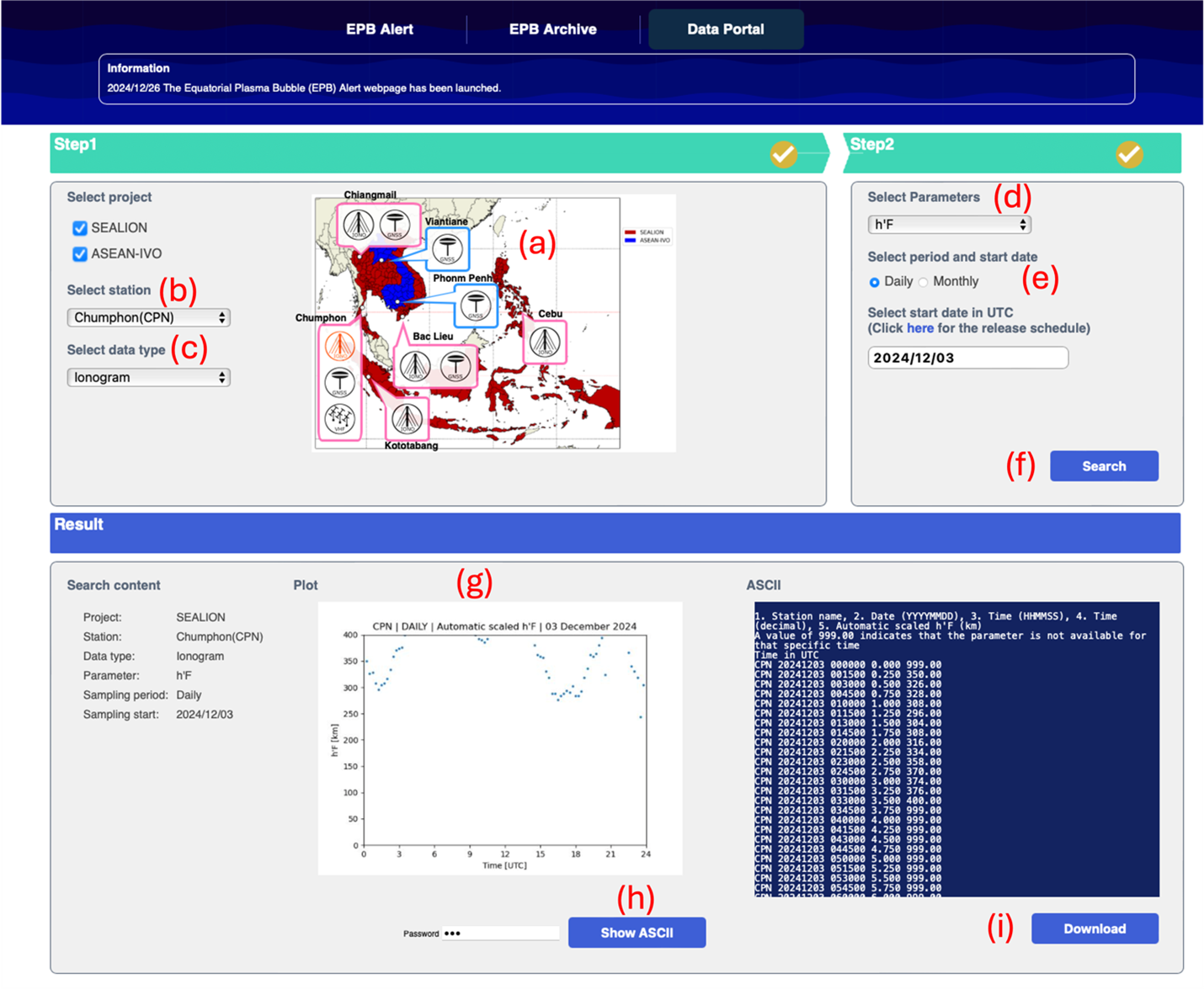
Figure 1. Data portal webpage